

blog
Check an API write after a PowerShell timeout
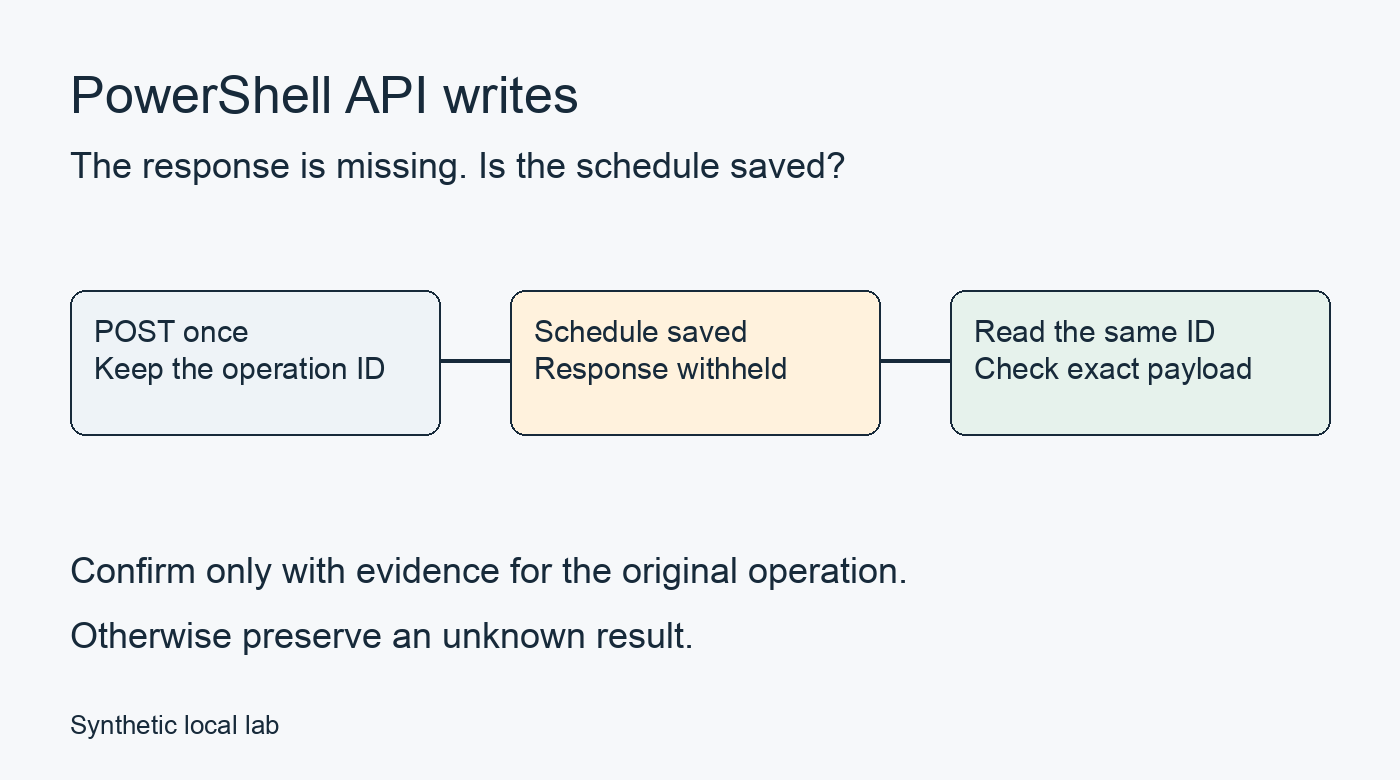
When a POST to save a schedule times out in Invoke-WebRequest, check the saved record before deciding whether to send the request again. This local lab uses the original operation ID for that check. After saving the server and client below, run pwsh -NoProfile -File ./client.ps1.
In the recorded LostResponse run, the API saved the schedule before PowerShell reported a timeout. Repeating the POST would have created another schedule. A GET with the original operation ID confirmed the saved write.
The API only stores configuration for a nightly inventory export; it doesn't run the export. Lost-response mode deliberately saves the schedule and withholds the response. You can compare the client result with the saved row, including cases where the client can't confirm an existing write.
Confirm the write before continuing
An Invoke-WebRequest error describes what the client observed. The server may already have committed the write. HTTP's idempotency rules explain why a communication failure alone doesn't justify repeating a non-idempotent request.
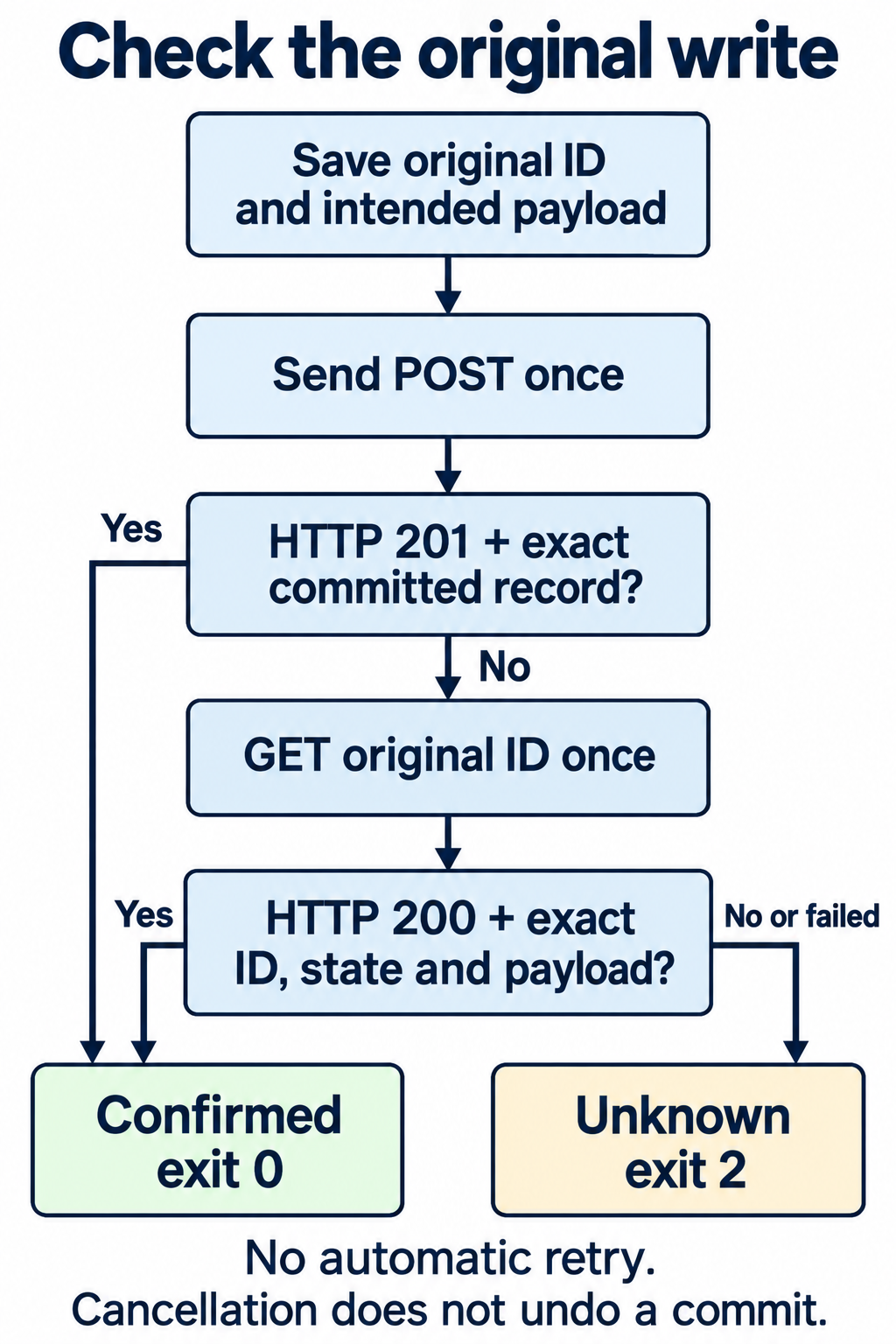
The client saves the operation ID and intended payload, then sends one POST. Only a 201 response containing that exact committed record confirms the write through the response.
If the POST doesn't confirm the write, the client makes one GET for the original ID. Only 200 with the exact record confirms success. Every other API result leaves the outcome unknown. The client never repeats the POST automatically. Stop any automation that depends on an unconfirmed write.
Expected lost-response result
The client generates an operation ID by default. The recorded LostResponse run used a fixed ID and returned this complete object with exit 0:
{
  "Outcome": "ConfirmedSuccess",
  "ConfirmedBy": "Readback",
  "OperationId": "f42a9b21-54ed-42ca-b21c-1b8c134af001",
  "WriteStatus": null,
  "WriteError": "System.Threading.Tasks.TaskCanceledException: The request was canceled due to the configured HttpClient.Timeout of 3 seconds elapsing.",
  "ReadStatus": 200,
  "ReadError": null,
  "Reason": "ExactCommittedRecord"
}
The GET confirmed the saved schedule, while WriteError kept the POST timeout. An independent file check found the saved record while the client was still waiting. When it finished, the request journal held one POST and one GET; the schedule file held one exact record.
To reproduce the run, start the API, save the complete client, then check the result and saved schedule. A successful HTTP status alone doesn't confirm the write; the response must also pass the record acceptance rules.
Start the API in terminal A
Use PowerShell 7.6, two terminals, a writable directory, and free loopback port 8765. The lab runs locally and needs no modules or credentials.
The lab was run programmatically on macOS 26.3.2 ARM64 with PowerShell 7.6.9 and .NET 10.0.14. All six scenarios also matched the expected results on Windows with PowerShell 7.6.9. Linux, Windows PowerShell 5.1, and the interactive two-terminal walkthrough were not tested.
In terminal A, start PowerShell:
pwsh -NoProfile
At the new PowerShell prompt, create the lab folder:
$PSVersionTable.PSVersion
New-Item -ItemType Directory -Path './api outcome lab'
Set-Location -LiteralPath './api outcome lab'
(Get-Location).Path
Receive-Request records each request in requests.jsonl. Save-Schedule appends the new schedule to schedules.jsonl before handling the response. The schedule can remain saved even if the response fails.
In LostResponse, Hold-Response keeps the unanswered HTTP context in memory while the listener accepts more requests. The client's GET can then reach Read-Operation and retrieve the saved schedule while the POST remains unanswered.
Save the complete server listing as server.ps1 in that folder:
param(
    [Parameter(Mandatory)][string]$RunDirectory,
    [ValidateSet('Normal', 'LostResponse', 'ReadbackUnavailable', 'ReadbackMissing',
        'ReadbackMismatch', 'ReadbackLost')][string]$Scenario = 'LostResponse',
    [ValidateRange(1024, 65535)][int]$Port = 8765
)
$ErrorActionPreference = 'Stop'
Set-StrictMode -Version Latest

function Send-Json($Context, [int]$Status, $Value) {
    $bytes = [Text.Encoding]::UTF8.GetBytes(($Value | ConvertTo-Json -Depth 6 -Compress))
    $Context.Response.StatusCode = $Status
    $Context.Response.ContentType = 'application/json; charset=utf-8'
    $Context.Response.ContentLength64 = $bytes.Length
    $Context.Response.OutputStream.Write($bytes, 0, $bytes.Length)
    $Context.Response.Close()
}

function Hold-Response($Context) {
    if ($held.Count -ge 8) { throw 'Eight held responses reached. Stop this lab run.' }
    $held.Add($Context)
}

function Save-Schedule($Context, [string]$Body) {
    $request = $Body | ConvertFrom-Json
    $record = [ordered]@{
        operationId = $request.operationId
        state = 'committed'
        payload = $request.payload
    }
    $line = $record | ConvertTo-Json -Depth 6 -Compress
    [IO.File]::AppendAllText($schedulePath, $line + "`n")
    $saved.Add($record)
    if ($Scenario -eq 'Normal') {
        Send-Json $Context 201 $record
        return
    }
    Hold-Response $Context
}

function Read-Operation($Context, [string]$Id) {
    if ($Scenario -eq 'ReadbackLost') { Hold-Response $Context; return }
    if ($Scenario -eq 'ReadbackUnavailable') { Send-Json $Context 503 @{}; return }
    if ($Scenario -eq 'ReadbackMissing') { Send-Json $Context 404 @{}; return }
    $matches = @($saved | Where-Object { $_.operationId -ceq $Id })
    if ($matches.Count -eq 0) { Send-Json $Context 404 @{}; return }
    if ($matches.Count -ne 1) { Send-Json $Context 409 @{}; return }
    $record = $matches[0] | ConvertTo-Json -Depth 6 | ConvertFrom-Json
    if ($Scenario -eq 'ReadbackMismatch') { $record.payload.timeUtc = '03:30' }
    Send-Json $Context 200 $record
}

function Receive-Request($Context) {
    $reader = [IO.StreamReader]::new($Context.Request.InputStream, [Text.Encoding]::UTF8)
    try { $body = $reader.ReadToEnd() } finally { $reader.Dispose() }
    $method = $Context.Request.HttpMethod
    $path = $Context.Request.RawUrl
    $entry = @{ method = $method; path = $path; body = $body } | ConvertTo-Json -Compress
    [IO.File]::AppendAllText($requestPath, $entry + "`n")
    if ($method -ceq 'POST' -and $path -ceq '/schedules') {
        Save-Schedule $Context $body
        return
    }
    if ($method -ceq 'GET' -and $path.StartsWith('/operations/', [StringComparison]::Ordinal)) {
        Read-Operation $Context $path.Substring(12)
        return
    }
    Send-Json $Context 404 @{}
}

$directory = New-Item -ItemType Directory -Path $RunDirectory
$schedulePath = Join-Path $directory.FullName 'schedules.jsonl'
$requestPath = Join-Path $directory.FullName 'requests.jsonl'
$saved = [Collections.Generic.List[object]]::new()
$held = [Collections.Generic.List[object]]::new()
$listener = [Net.HttpListener]::new()
$listener.Prefixes.Add("http://127.0.0.1:$Port/")
try {
    $listener.Start()
    Write-Output "READY http://127.0.0.1:$Port/ $Scenario"
    while ($listener.IsListening) {
        $pending = $listener.GetContextAsync()
        while (-not $pending.Wait(100)) { }
        Receive-Request $pending.GetAwaiter().GetResult()
    }
} finally {
    foreach ($context in $held) { $context.Response.Abort() }
    $listener.Close()
}
Start the server in the foreground:
pwsh -NoProfile -File ./server.ps1 -RunDirectory './run-lost' -Scenario LostResponse
Wait for READY http://127.0.0.1:8765/ LostResponse before starting the client. Startup fails if the run directory already exists or the port is busy. Use a fresh run directory for each scenario.
The server holds up to eight responses; the next attempted hold throws. A POST that reaches this limit has already appended its schedule, and the error doesn't undo that write. This boundary hasn't been runtime tested.
Save the intent in terminal B
Open a second terminal in the parent directory of the lab folder. Start PowerShell:
pwsh -NoProfile
At the new PowerShell prompt, select the lab folder:
Set-Location -LiteralPath './api outcome lab'
The top-level $id and $intent block builds the operation ID and payload, then encodes them as UTF-8. It opens $IntentPath with [IO.FileMode]::CreateNew, writes the intent, and closes the file before any network request. Both confirmation paths use this saved intent.
The default filename is intent.json. If it already exists, the client stops before sending anything. Rerunning the client won't automatically resume or resend an earlier intent.
A confirmed response or readback produces the full ConfirmedSuccess object and exit 0. If a completed API check can't confirm the write, it returns Unknown and exit 2. Stop automation that depends on the write.
Save the complete listing as client.ps1 in the lab folder:
param(
    [ValidateRange(1024, 65535)][int]$Port = 8765,
    [guid]$OperationId = [guid]::NewGuid(),
    [string]$IntentPath = './intent.json'
)
$ErrorActionPreference = 'Stop'
Set-StrictMode -Version Latest

function Get-JsonString($Value) {
    if ($Value -is [Text.Json.JsonElement]) {
        if ($Value.get_ValueKind().ToString() -ne 'String') { throw 'Expected a JSON string element' }
    } elseif ($Value -isnot [Text.Json.JsonProperty]) {
        throw 'Expected a JSON string element or property'
    }
    try {
        if ($Value -is [Text.Json.JsonProperty]) { return $Value.get_Name() }
        return $Value.GetString()
    } catch [ObjectDisposedException] { throw }
    catch [InvalidOperationException] {
        throw [Text.DecoderFallbackException]::new('Cannot decode provider JSON string.', $_.Exception)
    }
}

function Test-Fields($Element, [string[]]$Names) {
    if ($Element.ValueKind.ToString() -ne 'Object') { return $false }
    $expected = [Collections.Generic.HashSet[string]]::new($Names, [StringComparer]::Ordinal)
    $seen = [Collections.Generic.HashSet[string]]::new([StringComparer]::Ordinal)
    foreach ($property in $Element.EnumerateObject()) {
        $name = Get-JsonString $property
        if (-not $expected.Contains($name)) { return $false }
        if (-not $seen.Add($name)) { return $false }
    }
    return $seen.Count -eq $Names.Count
}

function Test-StringFields($Element, [string[]]$Names) {
    foreach ($name in $Names) {
        if ($Element.GetProperty($name).ValueKind.ToString() -ne 'String') { return $false }
    }
    return $true
}

function Get-RecordReason($Record) {
    if (-not (Test-Fields $Record @('operationId', 'state', 'payload'))) { return 'InvalidShape' }
    if (-not (Test-StringFields $Record @('operationId', 'state'))) { return 'InvalidShape' }
    $payload = $Record.GetProperty('payload')
    if (-not (Test-Fields $payload @('task', 'timeUtc', 'enabled'))) { return 'InvalidShape' }
    if (-not (Test-StringFields $payload @('task', 'timeUtc'))) { return 'InvalidShape' }
    if ($payload.GetProperty('enabled').ValueKind.ToString() -notin @('True', 'False')) {
        return 'InvalidShape'
    }
    $actual = @((Get-JsonString ($Record.GetProperty('operationId'))), (Get-JsonString ($Record.GetProperty('state'))),
        (Get-JsonString ($payload.GetProperty('task'))), (Get-JsonString ($payload.GetProperty('timeUtc'))))
    $expected = @($id, 'committed', $intent.payload.task, $intent.payload.timeUtc)
    for ($i = 0; $i -lt $expected.Count; $i++) {
        if (-not [string]::Equals($actual[$i], $expected[$i], [StringComparison]::Ordinal)) {
            return 'RecordMismatch'
        }
    }
    if ($payload.GetProperty('enabled').GetBoolean() -ne $intent.payload.enabled) { return 'RecordMismatch' }
    return 'ExactCommittedRecord'
}

function Get-ResponseReason($Response, [int]$ExpectedStatus) {
    if ($null -eq $Response) { return 'TransportError' }
    if ([int]$Response.StatusCode -ne $ExpectedStatus) { return "HttpStatus:$($Response.StatusCode)" }
    try { $document = [Text.Json.JsonDocument]::Parse([string]$Response.Content) }
    catch [Text.Json.JsonException] { return 'InvalidJson' }
    try { return Get-RecordReason $document.RootElement }
    catch [Text.DecoderFallbackException] { return 'UndecodableString' }
    finally { $document.Dispose() }
}

function Get-RequestError($Failure) {
    $exception = $Failure.Exception
    $detail = "$($exception.GetType().FullName): $($exception.Message)"
    if ($Failure.FullyQualifiedErrorId -like 'MaximumRedirectExceeded,*') {
        return "$detail $($Failure.ErrorDetails.Message)"
    }
    foreach ($type in @([Net.Http.HttpRequestException], [Threading.Tasks.TaskCanceledException], [TimeoutException])) {
        if ($exception -is $type) { return $detail }
    }
    throw $Failure
}

$id = $OperationId.ToString('D')
$intent = @{ operationId = $id; payload = @{ task = 'inventory-export'; timeUtc = '02:30'; enabled = $true } }
$json = $intent | ConvertTo-Json -Depth 4
$bytes = [Text.Encoding]::UTF8.GetBytes($json)
$file = [IO.File]::Open($IntentPath, [IO.FileMode]::CreateNew)
try { $file.Write($bytes, 0, $bytes.Length) } finally { $file.Dispose() }
$options = @{
    MaximumRetryCount = 0
    MaximumRedirection = 0
    ConnectionTimeoutSeconds = 3
    OperationTimeoutSeconds = 3
    HttpVersion = '1.1'
    DisableKeepAlive = $true
    NoProxy = $true
    SkipHttpErrorCheck = $true
    ErrorAction = 'Stop'
}
$result = [ordered]@{
    Outcome = 'Unknown'; ConfirmedBy = $null; OperationId = $id
    WriteStatus = $null; WriteError = $null; ReadStatus = $null; ReadError = $null; Reason = $null
}
$write = $null
try {
    Invoke-WebRequest @options -Uri "http://127.0.0.1:$Port/schedules" -Method Post `
        -Body $bytes -ContentType 'application/json; charset=utf-8' | ForEach-Object {
            $write = $_
            $result.WriteStatus = [int]$_.StatusCode
        }
} catch {
    $result.WriteError = Get-RequestError $_
}
$result.Reason = Get-ResponseReason $write 201
if ($result.Reason -eq 'ExactCommittedRecord') {
    $result.ConfirmedBy = 'Response'
} else {
    $read = $null
    try {
        Invoke-WebRequest @options -Uri "http://127.0.0.1:$Port/operations/$id" -Method Get | ForEach-Object {
            $read = $_
            $result.ReadStatus = [int]$_.StatusCode
        }
    } catch {
        $result.ReadError = Get-RequestError $_
    }
    $result.Reason = Get-ResponseReason $read 200
    if ($result.Reason -eq 'ExactCommittedRecord') { $result.ConfirmedBy = 'Readback' }
}
if ($null -ne $result.ConfirmedBy) {
    $result.Outcome = 'ConfirmedSuccess'
    [pscustomobject]$result | ConvertTo-Json
    exit 0
}
[pscustomobject]$result | ConvertTo-Json
exit 2
One Invoke-WebRequest POST sends the saved bytes. If the request throws, Get-RequestError keeps the native exception type and message for expected transport failures. It rethrows unexpected local errors. A timeout tells you what the client observed; the server may still have saved the schedule.
Get-ResponseReason $write 201 first requires status 201. It then calls Get-RecordReason to compare the response with the intent. The original ID, state committed, and intended payload must all match to return ExactCommittedRecord. A different record can't confirm this write, even with status 201.
If the response doesn't confirm the write, the client makes one GET to /operations/$id using the original ID. Get-ResponseReason $read 200 requires status 200 and an exact match for the expected record. This readback can confirm the saved write without another POST or a new operation ID.
The web-command timeout settings limit different waits. ConnectionTimeoutSeconds bounds a pending request; OperationTimeoutSeconds limits a stalled stream read. Both are three seconds here. Neither limits the whole script's runtime or tells the server to roll back. Status-based retries and redirects are disabled.
SkipHttpErrorCheck lets the client inspect an HTTP error response without throwing on its status. Confirmation still requires the expected status and exact record. See PowerShell's terminating-error handling for how request errors reach catch and Get-RequestError.
Check the result and the saved schedule
Run the client once in terminal B, then inspect its result and both server files:
pwsh -NoProfile -File ./client.ps1
$clientExit = $LASTEXITCODE
"Client exit: $clientExit"
$intent = Get-Content -LiteralPath './intent.json' -Raw | ConvertFrom-Json
Get-Content -LiteralPath './run-lost/schedules.jsonl' | ConvertFrom-Json | Format-List
Get-Content -LiteralPath './run-lost/requests.jsonl' | ConvertFrom-Json | Select-Object method, path
Compare your result with the complete lost-response result below the diagram. Before automation accepts success, require a completed invocation with the full ConfirmedSuccess object for the original operation ID and native exit 0. Exit 0 alone isn't enough.
Compare the server files with intent.json. Count requests and saved rows separately: ConfirmedSuccess doesn't tell you how many schedules were created. This run should have one POST to /schedules and one GET to /operations/ followed by the original $intent.operationId. The saved record must contain that ID, state committed, and payload values task: inventory-export, timeUtc: 02:30, and Boolean enabled: true.
A saved row can coexist with a 404
In ReadbackMissing, the server saves the exact schedule but returns 404 to the client's GET. Start a fresh run to inspect the saved row alongside the client result.
Stop the server with Ctrl+C in terminal A. The finally block closes the listener and held responses. The files remain available to inspect. Start the missing-readback scenario:
pwsh -NoProfile -File ./server.ps1 -RunDirectory './run-missing' -Scenario ReadbackMissing
Run the client once in terminal B with a new intent filename:
pwsh -NoProfile -File ./client.ps1 -IntentPath './intent-missing.json'
$LASTEXITCODE
Get-Content -LiteralPath './run-missing/schedules.jsonl'
The recorded client result was Unknown, ReadStatus: 404, Reason: HttpStatus:404, and exit 2. The schedule file still held the exact saved record. The lab hides that record from the read path, so its 404 doesn't establish rollback.
Before treating a missing record as evidence that no write occurred, check the API's documented read consistency and operation-retention guarantees.
All six recorded runs saved one row. The client stayed at Unknown when the GET returned 503, 404, a 200 record with the wrong time, or no response before timeout. Stop the server and use a fresh run directory and intent filename for each additional scenario.
Counts are POST / GET / saved rows.
| Scenario | POST | GET | Outcome / exit | Counts |
|---|---|---|---|---|
Normal | Exact 201 | Not requested | Confirmed by response / 0 | 1 / 0 / 1 |
LostResponse | Timeout | Exact 200 | Confirmed by readback / 0 | 1 / 1 / 1 |
ReadbackUnavailable | Timeout | 503 | Unknown / 2 | 1 / 1 / 1 |
ReadbackMissing | Timeout | 404 | Unknown / 2 | 1 / 1 / 1 |
ReadbackMismatch | Timeout | 200, wrong time | Unknown / 2 | 1 / 1 / 1 |
ReadbackLost | Timeout | Timeout | Unknown / 2 | 1 / 1 / 1 |
The ReadbackLost run exited with code 2 and returned this object.
{
  "Outcome": "Unknown",
  "ConfirmedBy": null,
  "OperationId": "f42a9b21-54ed-42ca-b21c-1b8c134af001",
  "WriteStatus": null,
  "WriteError": "System.Threading.Tasks.TaskCanceledException: The request was canceled due to the configured HttpClient.Timeout of 3 seconds elapsing.",
  "ReadStatus": null,
  "ReadError": "System.Threading.Tasks.TaskCanceledException: The request was canceled due to the configured HttpClient.Timeout of 3 seconds elapsing.",
  "Reason": "TransportError"
}
Reason reports ExactCommittedRecord or the check that failed: HTTP status, transport failure, invalid JSON, an undecodable string, invalid shape, or record mismatch. WriteError and ReadError keep the exception diagnostics. An unhandled local or script-terminating error exits 1. A completed Unknown API result exits 2.
Cancellation can stop the client before it emits a complete result without undoing the server commit. Microsoft documents Ctrl+C exit 0 for pwsh -File, so a missing or incomplete result leaves the write uncertain even with exit 0. This client has no cancellation-triggered GET in finally. Fresh cancellation wasn't measured here; behavior across hosts and termination mechanisms remains unverified.
Why a response can fail the record check
Confirming the wrong operation or schedule
Get-RecordReason checks the operation and its saved values. A different operation ID belongs to another write. A schedule for 03:30 doesn't match the intended 02:30. The record must say committed and match the original task and enabled value.
Test-StringFields requires JSON strings for operationId, state, task, and timeUtc. Get-JsonString decodes them for comparison with the original ID, committed, and the saved task and time. enabled must be a JSON Boolean equal to the intended true. The JSON string "true" fails.
Decoded property names and string values must match exactly, including case. The checks use culture-independent ordinal equality. Equivalent string escaping, property order, and whitespace can vary. Ordinary PowerShell comparisons may coerce values or ignore case; these checks allow neither.
Accepting missing or ambiguous fields
The client inspects fields with JsonDocument before comparing values. Test-Fields requires exactly operationId, state, and payload in the root object, and exactly task, timeUtc, and enabled in the payload object.
Each field must occur once in its object. Missing, extra, or duplicate fields fail. A one-element array in place of either object also fails. The client won't confirm an incomplete record or choose between duplicate values.
Accepting a string that cannot be decoded
.NET can parse JSON before decoding every property name or string value. Get-JsonString checks the local type before decoding. An unescape error during that later step can still prevent the response from confirming the write.
Get-ResponseReason reports this decoding failure as UndecodableString. If the 201 response fails this check, the client makes its one GET for the original ID. A 200 with the exact committed record can still confirm the write. An undecodable 200 readback leaves Unknown. Wrong local types, disposed objects, and unexpected errors still throw; they don't become uncertain API results.
Repeat the POST deliberately
Stop the previous server, then start Normal in terminal A:
pwsh -NoProfile -File ./server.ps1 -RunDirectory './run-normal' -Scenario Normal
Create one schedule in terminal B:
pwsh -NoProfile -File ./client.ps1 -IntentPath './intent-normal.json'
$LASTEXITCODE
Explicitly repeat the saved request once:
$ErrorActionPreference = 'Stop'
$intent = Get-Content -LiteralPath './intent-normal.json' -Raw | ConvertFrom-Json
$body = Get-Content -LiteralPath './intent-normal.json' -Raw
$options = @{
    MaximumRetryCount = 0; MaximumRedirection = 0
    ConnectionTimeoutSeconds = 3; OperationTimeoutSeconds = 3
    HttpVersion = '1.1'; DisableKeepAlive = $true; NoProxy = $true
    SkipHttpErrorCheck = $true; ErrorAction = 'Stop'
}
$repeat = Invoke-WebRequest @options -Uri 'http://127.0.0.1:8765/schedules' -Method Post `
    -Body ([Text.Encoding]::UTF8.GetBytes($body)) -ContentType 'application/json; charset=utf-8'
$lookup = Invoke-WebRequest @options -Uri "http://127.0.0.1:8765/operations/$($intent.operationId)"
[pscustomobject]@{ RepeatStatus = [int]$repeat.StatusCode; LookupStatus = [int]$lookup.StatusCode }
@(Get-Content -LiteralPath './run-normal/schedules.jsonl').Count
The recorded repeat produced:
RepeatStatus LookupStatus
------------ ------------
         201          409
2
The second POST returned 201 and added a second exact row. With two records for the same ID, the GET returned 409 instead of choosing one. The operation ID connects the requests to their records, but this server doesn't prevent duplicates.
Before retrying a production POST, check the server's documented key scope and how it binds the key to the payload. Duplicate handling must be atomic with the business effect. Check conflicting payloads, concurrent requests, key retention, and the lookup's read consistency. The server can ignore Idempotency-Key, so adding the header alone doesn't make a retry safe.
This listener is a teaching fixture with no authentication, concurrent business-write handling, or database transactions. The read index and held responses stay in memory. The JSON-lines files survive an ordinary stop, but the server doesn't reload them on restart. It doesn't guarantee crash consistency or power-loss durability.
If readback leaves the write unknown, keep the intent and result and stop automation that depends on the write. Check the original operation through the API's documented read path before deciding whether to send another POST.