

blog
Microsoft Exchange – OU picker is empty when creating new user

We've migrated one of our Clients fairly early but recently we got complain that when new user is created from ECP on Exchange 2013 there's no way to pick Organizational Unit (OU) where the user is supposed to be.
❗ Problem Description
It seems that OU Picker was not displaying any OU's. This is strange and a bit unexpected.
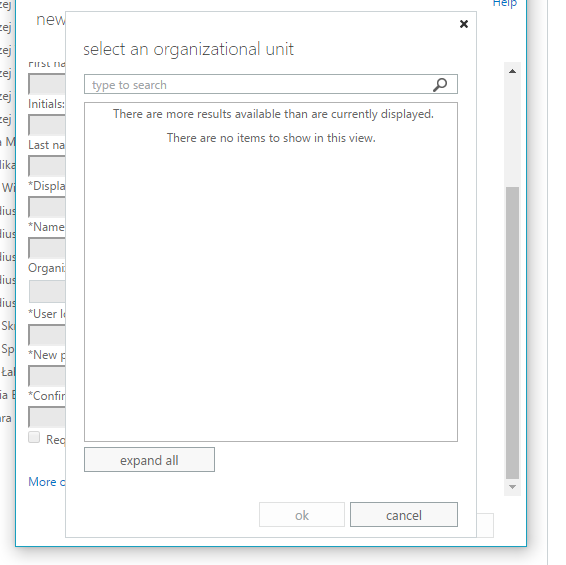
Quick verification that **Get-OrganizationalUnit **actually works as designed confirms that there must be something else here.

✅ Solution
It seems it's well known issue for Exchange Server 2013. It's described in KB303817 but a title is a bit misleading **Exchange Server 2013 doesn't display all OUs when it creates a new mailbox. **In our case it was not showing all organizational units and not just some of them. The fix is simple from there.
Check OU count in Exchange Management Shell
(Get-OrganizationalUnit -ResultSize unlimited).count

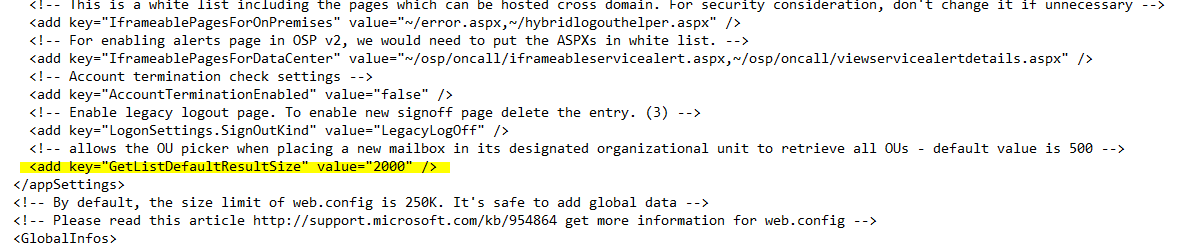
- Modify each servers web.config: **\\c$\Program Files\Microsoft\Exchange Server\V15\ClientAccess\ecp\web.config **by adding
just before AppSettings end ****
- After that it's just matter of opening IIS, finding **MSExchangeECPAppPool **and **recyling **it.
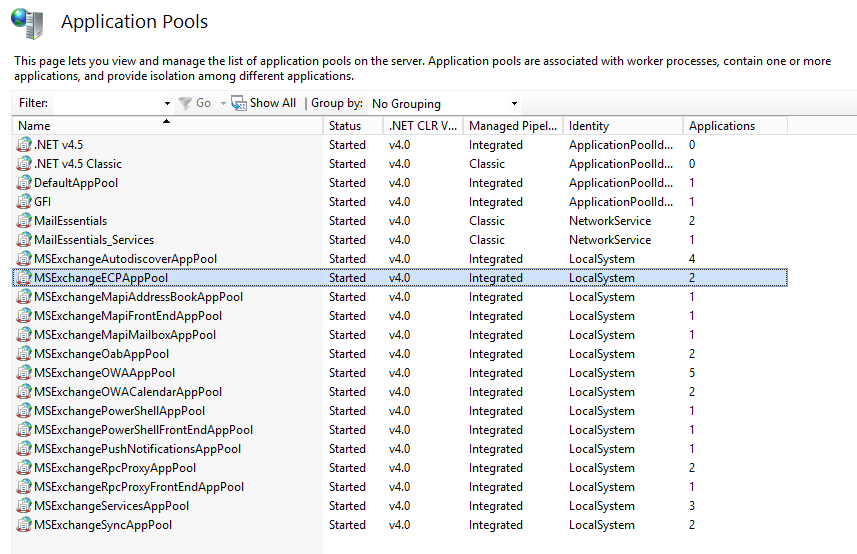
- Do this for every server that holds Mailbox Role.
📝 Notes
This change has to be added to web.config every time there's new Cumulative Update installed as it overwrites web.config. Make sure to add it to your TO DO list for Exchange upgrades.